Every club in ShuttleOps has a unique identifier, making it easy to manage access and control who can join.
Locating Your Club ID
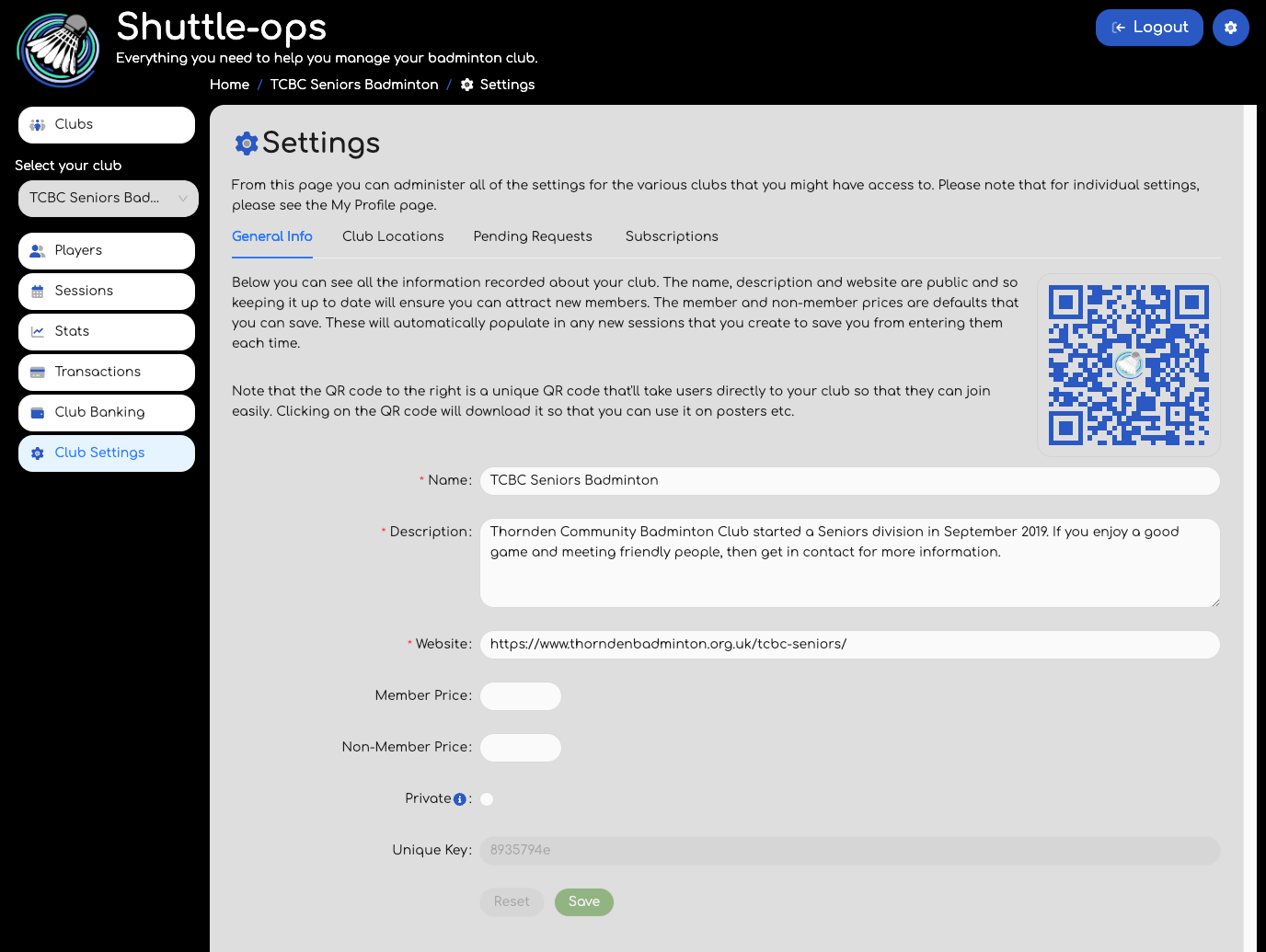
To find your club’s unique ID (referred to as the "Unique Key"):
- Navigate to the Club Settings page.
- Go to the General Info tab, where you’ll see the Unique Key field displayed.
Tip: If you manage multiple clubs, use the club dropdown in the menu to select the correct club to view its unique ID.
Share this key with new members, who can then enter it in the club ID search box on the Clubs Page. You can also download the unique QR code (found on the Club Settings page) to share on posters or promotional materials. Scanning the QR code takes users directly to your club. Here’s an example link format for your club: https://app.shuttleops.com/clubs?id=eaa2622a.
Setting Club Privacy
If you prefer to keep your club private:
- Go to the Club Settings page.
- Select the checkbox labeled "Private".
- Save your settings
This option prevents your club from appearing in general searches. Members will only be able to find it by entering the Club ID in the search field.
And that’s it! You now have full control over who can join and how your club appears on ShuttleOps.
Was this article helpful?
That’s Great!
Thank you for your feedback
Sorry! We couldn't be helpful
Thank you for your feedback
Feedback sent
We appreciate your effort and will try to fix the article