The Players page allows you to manage the members of your club, if you have the Administrator role within the app. The table will list all the players currently members of your club but these players will either be active members of ShuttleOps who are able to log in and see their own data, or players that you have created to help you track sessions. Depending on what type of account they are will depend on what changes you are able to make.
Using the menu for the player you'll have at most four options as shown below :
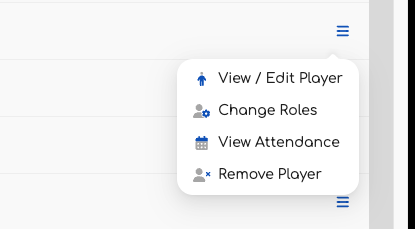
If the player has not yet registered with ShuttleOps then you will not be able to change the role for this player because they don't yet have an account to associate those permissions to. For a similar reason, if the player has registered for ShuttleOps then you will not be able to edit their name, email address or other details of their profile because that will then be their responsibility.
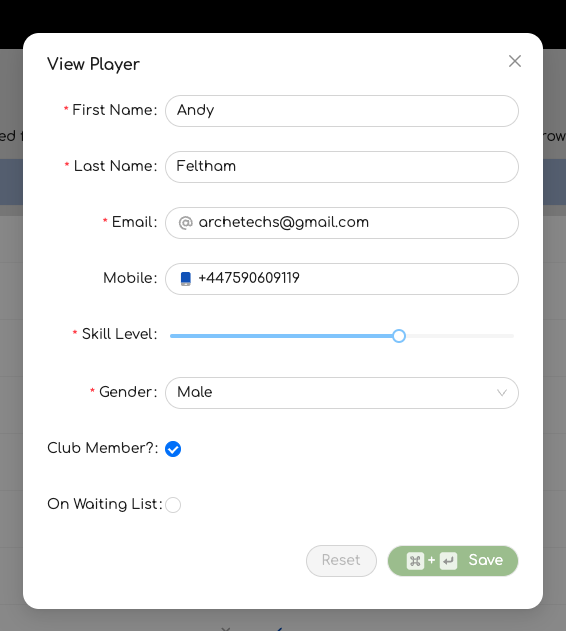
When editing a player you will however be able to toggle two attributes - their membership status, and if they are on a waiting list. The membership status is unique to your club and so they can for example be an member of one club on ShuttleOps, but not a member of yours. In this context the membership status allows you to charge different amounts for a session to members, versus visitors or non members for example. It is up to you how you use this status.
Note that the skill level is an arbitrary value from 1 to 10 that gives an indication of the player skill. This is used when assigning members to a court. Be aware that this value is for the player, not the player at a specific club and so should be set appropriately.
There are three roles for players within ShuttleOps - Owner, Administrator, Finance.
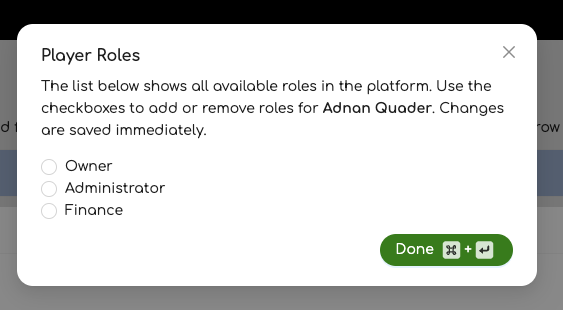
Using the radio buttons you can select or deselect any roles you wish to have for this player. The Owner role will control the club and be able to assign roles to users. They will also receive the notifications when players wish to join your club. The Administrator role will be able to create sessions and manage the games within that session while the Finance role is able to look at money owed to the club by players. Note that the owner is the combination of the administrator and finance roles.
If you need to, removing a player will remove the association that player has with the current club. This does not remove their profile from ShuttleOps but will mean that they are no longer in the list of players for a session. Their statistics and previous transactions are still available for ongoing tracking purposes but they'll no longer get notifications about events for this club.
Was this article helpful?
That’s Great!
Thank you for your feedback
Sorry! We couldn't be helpful
Thank you for your feedback
Feedback sent
We appreciate your effort and will try to fix the article